Reading: APX7000XE Quick Reference
Radio Operations
APX7000XE basics, a full radio channel guide, emergency procedures, Bendix King operation, and disposition codes.
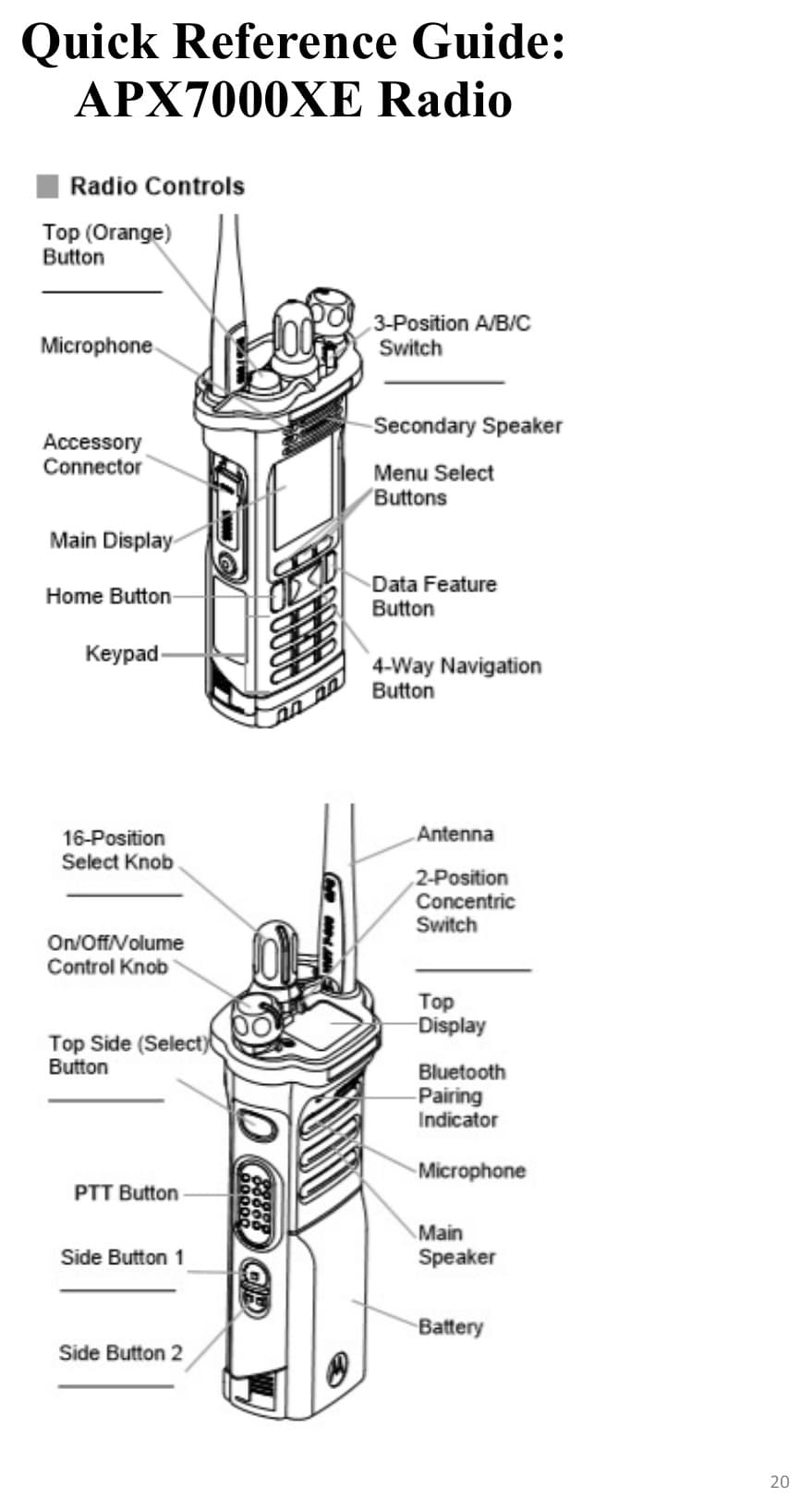
APX7000XE Quick Reference
Turn On/Off:
- Turn the radio on by rotating the On/Off/Volume Control Knob clockwise until you hear a click.
- Turn the radio off by rotating the On/Off/Volume Control Knob counterclockwise until you hear a click.
Select a Channel:
- Rotate the 16-position Channel select knob to the desired channel. The new channel name will appear on the display.
- Press the PTT button to transmit. When speaking keep the microphone 1-2" directly in front of your mouth.
- Release PTT button to listen.
Select a Zone:
- Press the right side of the 4-way Navigation button until Zone displayed.
- Press the Menu Select button directly below Zone.
- Press the Up or Down Navigation button to the required Zone.
- Press the Menu Select button directly below SEL to confirm displayed Zone.
Radio Channel Guide
Common zones: Zone A = OKLFR1 · Zone B = OKLFR2 · Zone D = POSY/WEBSTR · Zone UU = WILDLAND.
This track now includes the full common channel table. Quick Ref keeps the same data in a faster per-zone view.
| Ch | Zone A | Zone B | Zone D | Zone UU |
|---|---|---|---|---|
| 1 | OKL DSP 1 | OKL DSP 1 | OKL DSP 1 | OKL DSP 1 |
| 2 | OKL TAC 2 | XAL DSP 3 | OKL TAC 2 | OKL TAC 2 |
| 3 | OKL TAC 3 | EMYTAC1 | OKL TAC 3 | OKL TAC 3 |
| 4 | OKL TAC 4 | CMED | OKL TAC 4 | OKL TAC 4 |
| 5 | OKL TAC 5 | EMS TAC40 | 8CALL90D | SCU L T6 |
| 6 | OKL TAC 6 | OKL FPB1 | 8TAC91D | CDF C1 T1 |
| 7 | OKL TAC 7 | OKL FPB2 | 8TAC92D | CDF TAC 2 |
| 8 | OKL TAC 8 | OKL HAZ1 | 7FIRE63D | CDF TAC 6 |
| 9 | OKL TAC 9 | OKL HAZ2 | 7FIRE83D | CDF TAC 9 |
| 10 | OKL CMD 1 | OKL TRN1 | XAL DSP 1 | XALVTAC4 |
| 11 | OKL CMD 2 | OKL TRN2 | XAL TAC 3 | VFIRE 22 |
| 12 | OKL AIRPORT | OKLBATT2 | XAL TAC 4 | VFIRE 23 |
| 13 | OKL OPD | OKLBATT3 | XAL FIR1D | AIR TAC5 |
| 14 | XAL VTAC 4 | OKLBATT4 | XAL FIR3D | CALCORD |
| 15 | XALFIR3D | OKL SPT1 | VFIRE 22 | CDF A/G 3 |
| 16 | OKL EMRG | OKL EMRG | XAL VTAC 4 | GUARD |
Emergency Button Procedure
- With the radio turned on, press the emergency button on either the mic or radio for 1 second.
- The display alternates between showing "EMERGENCY" and the current trunked zone and talkgroup/channel.
- Dispatch will activate alert tone for 3 seconds.
- Press the PTT button and announce your emergency.
- Release the PTT button to end the transmission and wait for a response from the dispatcher.
Dispatch cannot clear an emergency. The radio user should NEVER clear a true emergency on their radio without being instructed to do so by dispatch.
Notify dispatch that "The scene is safe". Depress and hold the EB for 5 seconds.
Bendix King GPH CMD Operation
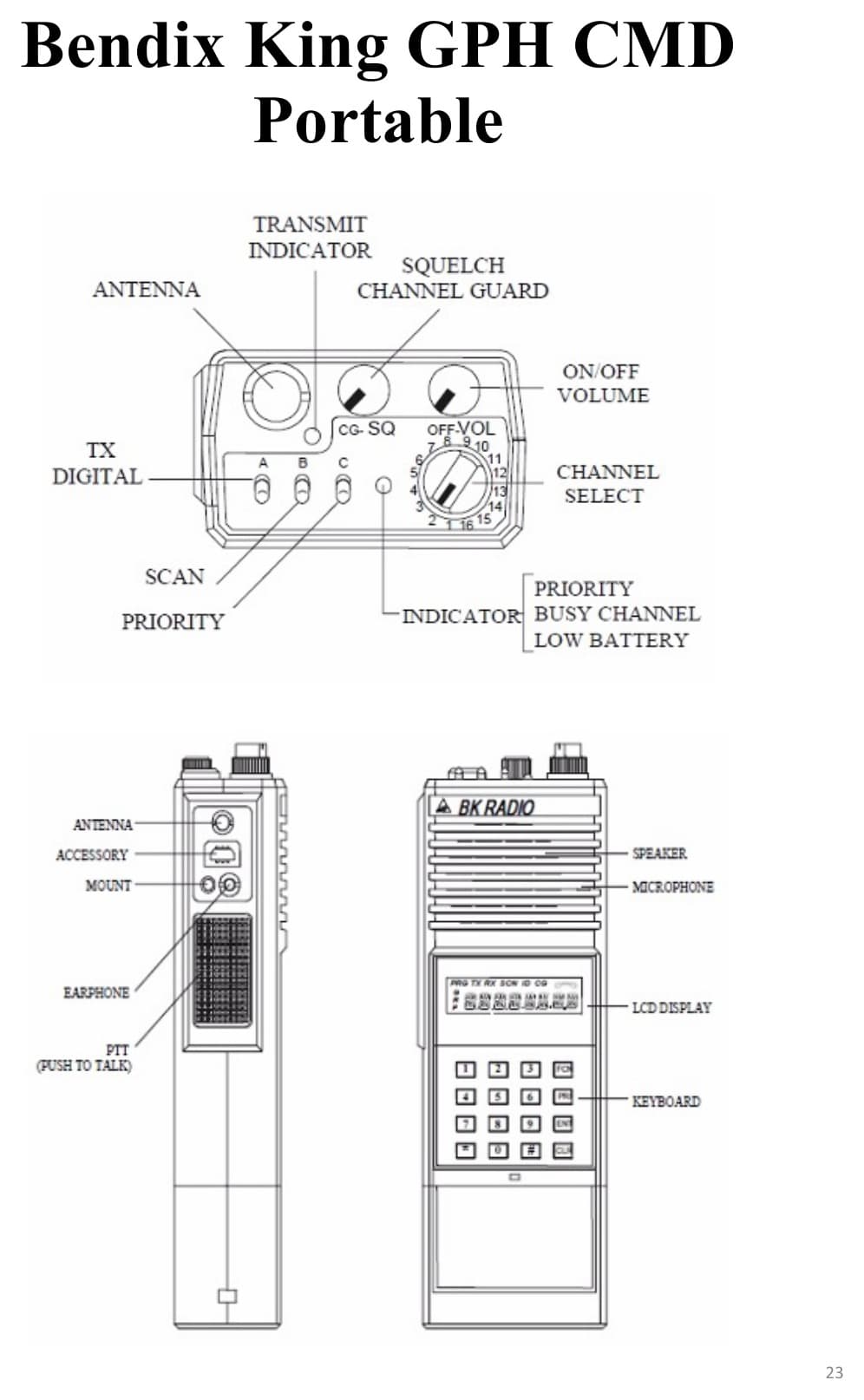
Bendix King GPH CMD Portable — 25 Groups, 20 channels per Group, 500 total channels
Power: HI = 5 watts, LO = 1 watt
Changing Banks:
- Press # key
- Press desired bank through the key pad
- Press ENT
Command Group:
- To enter a channel: go to desired channel, press * (star) key.
- To remove a channel: hold * key and press # key.
- To delete entire Command Group: press and hold * key until display reads CMND EMPTY.
- After programming channels: press # key twice (display reads GRP CMND), then press ENT.
Lock Keypad: Press and hold FCN key until display reads LOCKED. To unlock, press and hold FCN key until display reads UNLOCKED.
Disposition Codes
| Code | Meaning |
|---|---|
| AMA | Against Medical Advice |
| CC | Call Completed |
| CAN | Cancelled |
| CPA | Cancelled Prior to Arrival |
| CF | Confirmed Fire |
| DUP | Duplicate |
| FA | False Alarm |
| GOA | Gone on Arrival |
| GI | Good Intent |
| HM | Hazard Mitigated |
| NF | Nothing Found |
| NMN | No Medical Needed |
| NPCR | No Patient Care Report |
| OOA | Out on Arrival |
| PRS | Patient Released on Scene |
| PTA | Patient Transported by Ambulance |
| PTP | Patient Transported by Private Car |
| SM | System Malfunction |
| SS | Smoke Scare |
| UTL | Unable to Locate |
Example Radio Traffic:
- Dispatch: Engine 29, Oakland Fire
- E29: Go ahead Oakland Fire to Engine 29
- Dispatch: Engine 29 we need the engine for a sick person at 7200 San Leandro near the agent's booth.
- E29: Copy Oakland Fire. Engine 29 responding to 7200 San Leandro for a sick person.
- Dispatch: Engine 29 Responding